

NVMe SSD VPS hosting is what you should consider if you want performance without paying a fortune. At ARNL Web Solutions, we help you pick smart hosting, build websites, apps and rank high in search. Here’s a breakdown of why an NVMe SSD VPS is a strong choice, how to evaluate plans, and how our services tie in so you get full value.
What Is an NVMe SSD VPS?
An NVMe SSD VPS (Virtual Private Server) uses NVMe (Non-Volatile Memory Express) solid-state drives which are far faster than traditional SSD or HDD. It gives you:
- Much faster storage read/write speeds.
- Lower latency—your site loads quicker.
- Better performance when you’ve got many visitors or complex tasks.
For a growing blog, business site, or app server this matters.
Why It Matters for Your Website or App
When you host a site or app, you want these three things: speed, stability, and value. An NVMe SSD VPS helps all three:
- Speed: Faster page loads matter for user experience and search ranking.
- Stability: With dedicated resources you avoid slowdowns from neighbours.
- Value: With the right plan you pay reasonable monthly and get strong specs.
At ARNL Web Solutions we build sites, mobile apps & offer SEO. If your hosting is weak, you’ll lose traction no matter how good your app or site is.
Example Plans You Can Choose
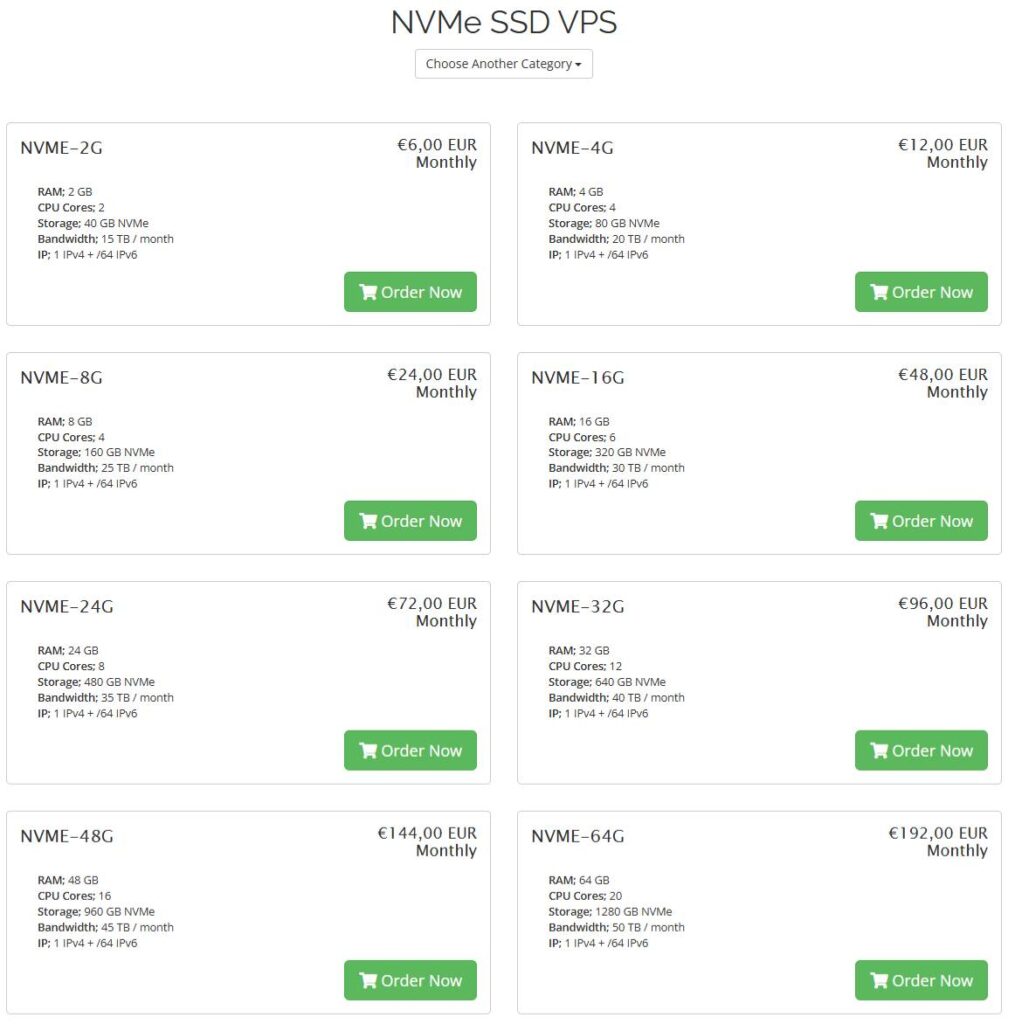
Here are sample plans from a provider offering NVMe SSD VPS (for transparency). They show how specs scale and how you pick according to your need.
| Plan Name | RAM | CPU Cores | Storage (NVMe) | Bandwidth | Price (€/mo) |
|---|---|---|---|---|---|
| NVME-2G | 2 GB | 2 | 40 GB | 15 TB | €6 |
| NVME-4G | 4 GB | 4 | 80 GB | 20 TB | €12 |
| NVME-8G | 8 GB | 4 | 160 GB | 25 TB | €24 |
| NVME-16G | 16 GB | 6 | 320 GB | 30 TB | €48 |
| NVME-24G | 24 GB | 8 | 480 GB | 35 TB | €72 |
| NVME-32G | 32 GB | 12 | 640 GB | 40 TB | €96 |
| NVME-48G | 48 GB | 16 | 960 GB | 45 TB | €144 |
| NVME-64G | 64 GB | 20 | 1280 GB | 50 TB | €192 |
These are real-world specs showing how you scale up as your needs grow.
How to Choose the Right Plan
Here’s what you should check when picking an NVMe SSD VPS plan:
1. Estimate Your Traffic & Resource Needs
If you have a small blog or basic site, a lower plan might suffice. If you run apps, large media, or high traffic you’ll need more RAM, cores, and storage.
2. Storage & Bandwidth Matters
NVMe gives fast disk I/O. Make sure the plan gives enough bandwidth so you’re not throttled or hit extra costs if traffic spikes.
3. Location & Latency
Where the data-centre is matters. If most of your users are in one region, pick a hosting location near them. Lower latency gives better performance.
4. Uptime, Support & Upgrade Options
Check the provider guarantees uptime (e.g., 99.9%) and offers easy upgrades. Good support means you won’t be stuck if issues arise.
5. Value Over Time
Initial low cost is good but check renewal price, hidden fees, and whether the provider oversells hardware (which can slow down your server).
Why ARNL Web Solutions Recommends This
At ARNL Web Solutions — Web Development, Mobile Apps & SEO — we see many sites slow down or fail because of weak hosting. When you start with a solid NVMe SSD VPS plan:
- Your site load speed improves → better user experience.
- SEO improves: faster sites rank better and convert better.
- You gain headroom to grow without migrating too early.
- We can build your site/app on a strong platform and offer ongoing SEO support.
We also link internally to help you:
- If you use WordPress as your site platform, see our guide What Is WordPress?
- Compare themes for performance in Top 10 Fastest Free WordPress Themes
- Optimize your site further using Top 10 WordPress Cache Plugins
By pairing strong hosting + good platform + SEO you get a better outcome.
Use-Case Scenarios
| Scenario | Recommended Plan | Why It Fits |
|---|---|---|
| Simple blog or brochure website | NVME-2G or NVME-4G | Modest traffic, basic resources |
| Medium site or small app backend | NVME-8G or NVME-16G | More RAM + storage for more content/users |
| High-traffic site or complex app | NVME-24G or above | Large storage, RAM, and bandwidth required |
Deployment & Migration Tips
- Always back up your current site before migrating.
- Choose a hosting provider with instant setup or minimal wait.
- Use a staging environment if possible to test your site on the new server.
- Enable caching (via WordPress plugins if you use WP) so you get maximum performance benefit.
- After migration, check site speed via tools like GTmetrix or PageSpeed Insights — make sure you improved load time.
- Update DNS settings and keep an eye on propagation time.
Common Mistakes & How to Avoid Them
- Picking too small a plan and then hitting resource limits → start conservative but allow room to scale.
- Hosting far away from your audience → increases latency, slows site.
- Ignoring disk performance → NVMe vs regular SSD makes a big difference.
- Not measuring actual performance → after moving, monitor speed, user load, errors.
How Hosting Fits With SEO & Apps
Hosting affects more than just uptime. It impacts:
- User Experience: Slow sites have higher bounce rates, weaker conversions.
- Search Rankings: Search engines use page speed as ranking factor.
- App Performance: If you build custom mobile apps, backend speed matters.
- Growth: Good hosting allows you to add features without smashing bottlenecks.
At ARNL Web Solutions we combine hosting advice with web development, mobile app building and SEO. That full-stack approach means your site isn’t just live — it’s optimized to grow.
Key Benefits of NVMe SSD VPS Hosting
- Faster storage I/O means your database, files, media load quicker.
- Better user experience leads to higher time on site, more conversions.
- Scalability: Many plans let you upgrade resources easily.
- Modern hardware: Providers using latest tech give you reliability and performance.
- Bandwidth & traffic allowances: Many NVMe VPS plans come with large TB of monthly traffic.
Why Choose a Europe-Based Provider
If your audience is in Europe, hosting in the Netherlands or nearby gives you:
- Lower latency (faster response times)
- Strong connectivity and infrastructure
- Time-zone alignment for support and maintenance
One provider lists its Netherlands base as a core feature. LiteServer+1
When to Upgrade Your Plan
You’ll know it’s time to upgrade when:
- Your page load speed is slipping despite caching.
- Traffic increases or you launch new features.
- Your storage usage gets high (media, logs, backups).
- Your server load (CPU/RAM) consistently high on monitoring.
- You want more resources for future growth.
Relationship With Other Services (At ARNL Web Solutions)
Here’s how hosting ties with our other services:
- Web Development: We build your site so it’s efficient, responsive and ready for growth.
- Mobile Apps: Backend services need reliable hosting; an NVMe SSD VPS gives you that.
- SEO: Faster sites = better metrics; we optimize content, structure, links, speed. You can learn more from our Search Engine Optimization guide.
FAQ – Quick Answers
Q: Can a small blog use NVMe SSD VPS?
Yes. Even the entry-level plan offers better performance than many shared hosts.
Q: Is NVMe always necessary?
If your site is very small and traffic is low, you might not need it— but it gives headroom and better experience. Think long-term.
Q: What happens if I exceed bandwidth?
Some providers throttle speed rather than charge extra. Ensure you check policy. (One provider mentions bandwidth limitation after hitting limit.) LiteServer
Q: Do I need upgrades immediately?
Not unless you see signs of resource strain or expect growth.
Final Thoughts
Choosing the right hosting is foundational—not optional. An NVMe SSD VPS gives you strong infrastructure so the rest of your strategy (site build, app, SEO) can shine without being held back by slow servers. At ARNL Web Solutions we pair great hosting with development and SEO to give you complete value.
If you’re ready to move your site, app, or project to a faster, more reliable platform, we can help you choose and make the transition smooth—so you’re not just online, you’re optimized.