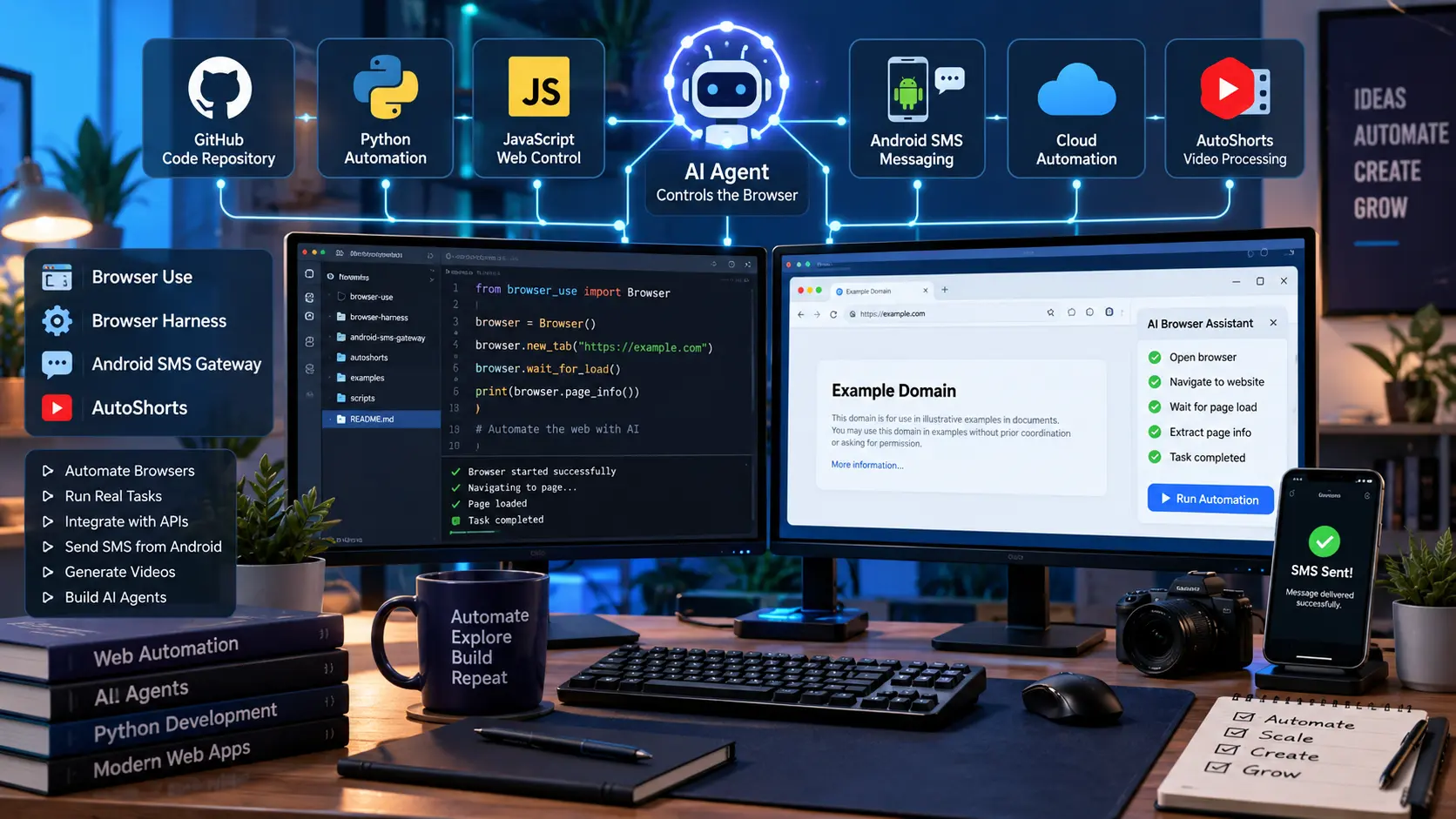
GitHub AI automation tools are becoming useful for developers who want software to interact with websites, browsers, mobile devices and media files without doing every step by hand. In our recent work with ARNLWeb Solutions, we looked at several GitHub projects that solve different parts of this problem, including Browser Use, Browser Harness, Browser Harness JS, Android SMS Gateway and the AutoShorts project.
These projects are not replacements for one another. Each has a different job.
Browser Use is focused on giving AI agents access to web browsers. Browser Harness provides a browser connection layer based on Chrome DevTools Protocol. Browser Harness JS provides a JavaScript bridge for Chrome CDP. Android SMS Gateway uses an Android phone as an SMS gateway. AutoShorts is a local video-processing project that brings together tools such as Python, FFmpeg, Whisper and YuNet face tracking.
For developers, the interesting part is how these tools can fit into larger automation systems.
What We Tested and Worked With
Here is the simple picture:
| Project | Main purpose | Main technology | Useful for |
|---|---|---|---|
| Browser Use | AI browser automation | Python, Rust, browser tools | AI agents |
| Browser Harness | Connect AI agents to browsers | Chrome CDP | Browser control |
| Browser Harness JS | JavaScript Chrome bridge | JavaScript, CDP | JS browser automation |
| Android SMS Gateway | Send and receive SMS through API | Android, HTTP API | SMS automation |
| AutoShorts | Automatic short-video creation | Python, FFmpeg, Whisper, OpenCV | Video production |
The first three projects are closely related. The Android SMS Gateway solves a different problem, while AutoShorts belongs to video automation.
Browser Use


Browser Use on GitHub is the main project we explored for AI-powered browser automation.
The idea is simple: instead of an AI system only generating text, it can work with a real browser and perform tasks on websites.
The current project describes Browser Use as a way to make websites accessible to AI agents. Its newer architecture uses a Python interface, a Rust core and Browser Harness.
That opens up many possible tasks.
An AI agent can be asked to:
- open a website
- navigate between pages
- read page information
- click controls
- enter text
- work with browser tabs
- take screenshots
- interact with web applications
- complete multi-step browser tasks
This is different from a normal web scraper.
A scraper normally follows a fixed set of instructions. An AI browser agent can make decisions based on what it sees.
For example, a normal automation script might say:
Open page A, click button B, enter text C.
An AI agent can instead receive a goal such as:
Find the required information on this website and report the result.
The agent can decide which controls to use.
Browser Use and Python
Browser Use also supports Python-based agents.
The project documentation currently shows the newer beta agent using:
from browser_use.beta import Agentalong with a browser profile and an LLM.
This is useful for developers because the browser automation becomes part of a normal Python application.
A project can combine:
Python + AI model + Browser Use + Browser Harness + Chrome
That can form a complete browser automation system.
Browser Harness


Browser Harness is one of the most important repositories in this group because it handles the browser connection.
The project describes itself as a thin, editable CDP harness that connects an LLM directly to a real browser.
CDP means Chrome DevTools Protocol.
Chrome provides this protocol for controlling and inspecting browser sessions. Browser Harness uses it as the connection between the automation system and Chrome.
This gives an AI agent access to browser actions without requiring a large layer between the agent and Chrome.
Why Browser Harness matters
During our setup, this was also the part that caused the most confusion.
The browser automation command was installed correctly, but the daemon could not connect to Chrome because Chrome was not exposing the required remote debugging connection.
The error was:
DevToolsActivePort not foundThe Browser Harness documentation explains that the harness needs a browser connection and supports local Chrome or Chromium-based browsers as well as Browser Use cloud browsers.
That distinction is important.
Installing the Python package does not automatically mean that an existing Chrome installation is ready for remote browser control.
Browser Harness architecture
The project is designed around a small number of parts:
- browser connection
- Chrome CDP
- daemon
- interaction helpers
- agent workspace
- optional domain skills
The repository also contains interaction skills for tasks such as:
- downloads
- uploads
- screenshots
- tabs
- scrolling
- iframes
- dialogs
- cookies
- network requests
- video recording
This makes Browser Harness useful beyond simple page navigation.
Browser Harness JS


Browser Harness JS is the JavaScript version of the browser connection idea.
The repository describes it as a thin bridge from an LLM to Chrome, exposing Chrome DevTools Protocol methods through typed JavaScript calls.
This matters if your application is mainly written in JavaScript or TypeScript.
Instead of building a Python application around Browser Harness, a developer can work with the JavaScript ecosystem.
The repository currently describes:
- a persistent WebSocket
- Chrome CDP
- typed JavaScript calls
- access to CDP domains
- browser interaction without adding a large abstraction layer
Browser Harness vs Browser Harness JS
The difference is easier to understand in a table.
| Feature | Browser Harness | Browser Harness JS |
|---|---|---|
| Main language | Python | JavaScript |
| Browser connection | Chrome CDP | Chrome CDP |
| Main use | AI/browser agents | JS browser control |
| Connection | WebSocket/CDP | WebSocket/CDP |
| Best fit | Python AI systems | Node.js/TypeScript systems |
Both projects are about giving software direct browser control.
The main difference is the development environment.
Android SMS Gateway

The fourth project we discussed is completely different.
Android SMS Gateway turns an Android smartphone into an SMS gateway.
The project provides an API that applications can use to send and receive SMS messages through an Android device. It supports local server operation as well as cloud-server use.
This can be useful when you want your own Android phone to act as the SMS hardware.
For example:
Your application → API → Android phone → mobile network → SMS recipient
The phone handles the actual mobile network connection.
Features
The project supports:
- sending SMS
- receiving SMS
- message status tracking
- webhooks
- multiple SIM cards
- multiple devices
- MMS-related events
- data SMS
- local server mode
- cloud server mode
The repository also supports Android 5.0 and later according to its documentation.
Local SMS server
One useful feature is local operation.
The Android device can expose an API on the local network.
Your application can then send an HTTP request to the phone.
This can be useful for:
- login codes
- alerts
- order updates
- appointment reminders
- internal notifications
- application testing
The project also supports webhooks for incoming messages, which means your server can receive an event when a message arrives.
The repository specifically says it is not intended for batch SMS sending because mobile operators may apply restrictions.
AutoShorts: AI Video Automation
The fifth project we worked with was AutoShorts, our local video automation project.
This project has a different goal.
Instead of controlling websites, AutoShorts works with video files and tries to automate the process of creating short-form videos.
The workflow we tested included:
Video → transcription → face detection → face tracking → crop information → short-video rendering
The project uses Python for several media tasks and Rust/Tauri for the desktop application.
One of the important parts we worked on was face tracking.
YuNet Face Detection
OpenCV’s YuNet face detector was used to locate faces in the source video.
We tested the installed OpenCV version with:
OpenCV: 4.10.0and successfully loaded the YuNet ONNX model.
The face detector test returned:
YuNet OKThat confirmed that OpenCV could load the face detection model correctly.
This is important for vertical video.
A landscape video may contain a person on one side of the frame. If the video is simply cropped from the center, the person’s face can disappear.
Face tracking lets the crop follow the person.
Optical Flow Tracking
Running a face detector on every video frame can take more processing time.
The AutoShorts tracker therefore uses a combination of YuNet detection and optical flow.
In our test, the source video contained:
Resolution: 606x1080
FPS: 29.970
Frames: 2643
The tracker used:
Detection interval: every 10 framesThe completed run reported:
Frames processed : 2643
YuNet frames     : 214
Optical frames   : 2116
Lost frames      : 313
This shows the basic idea.
YuNet periodically finds the face.
Optical flow follows movement between detection frames.
When tracking is lost, the next detection can help find the face again.
This can reduce the need to run face detection on every frame.
How These Projects Fit Together
These repositories become more interesting when we stop looking at them as separate tools.
A larger automation system could contain several layers.
AI Agent
   │
   ├── Browser Use
   │       │
   │       └── Browser Harness
   │                │
   │                └── Chrome
   │
   ├── Browser Harness JS
   │       │
   │       └── JavaScript applications
   │
   ├── Android SMS Gateway
   │       │
   │       └── Android phone
   │                │
   │                └── Mobile network
   │
   └── AutoShorts
           │
           ├── Whisper
           ├── OpenCV
           ├── YuNet
           ├── Optical Flow
           └── FFmpeg
This is where the projects can become useful for a developer.
One system can use a browser to collect information, an API to send notifications, and a media pipeline to create videos.
Browser Use vs Traditional Browser Automation
There is an important difference between AI browser automation and traditional automation.
Traditional tools normally depend on fixed selectors and fixed steps.
For example:
Open website
Click login
Enter username
Enter password
Click submit
An AI browser agent can work from a goal.
For example:
Log in and find the latest report.The agent can inspect the page and decide which actions are needed.
This does not mean AI browser automation will always work better.
Traditional automation is often better when the website and workflow never change.
AI agents become more useful when the task needs decisions.
Browser Use and YouTube
One reason we explored Browser Use was the problem we encountered while trying to download a YouTube video.
The normal yt-dlp command returned:
Sign in to confirm you’re not a bot.This is a browser/session problem rather than simply a download command problem.
Browser automation can be useful for websites where the normal API or command-line request does not provide the same session state as a real browser.
However, Browser Use is not a replacement for yt-dlp.
They solve different problems.
yt-dlp: media extraction and downloading.
Browser Use: browser interaction and web task automation.
A larger application could potentially use both, depending on the site’s rules and the task.
Python Versions Matter
During the setup we also found an important point about Python versions.
The older AutoShorts environment was using Python 3.10.
Browser Use’s current documentation states that the newer native-core installation requires Python 3.11 or newer.
We therefore installed Python 3.12 with uv.
The environment was created with:
Python 3.12.11This kept the Browser Use environment separate from the existing AutoShorts Python installation.
That is a good approach when two projects need different package versions.
For example:
| Project | Python environment |
|---|---|
| AutoShorts | Existing Python 3.10 |
| Browser Use | Python 3.12 virtual environment |
Keeping separate environments avoids changing packages in an application that is already working.
Why uv Is Useful
We used uv to install Python 3.12 and create the Browser Use virtual environment.
The basic setup was:
uv python install 3.12Then:
Set-Location "H:\aitools\browser-use"
uv venv --python 3.12
After activation:
.\.venv\Scripts\Activate.ps1This created:
H:\aitools\browser-use\.venvThe Browser Use package was then installed into that environment.
This keeps Browser Use separate from the global Python installation.
The Browser Daemon Problem
The package installation was successful, but the browser connection was not.
The diagnostic command showed:
[ok  ] chrome running
[FAIL] daemon alive
[FAIL] active browser connections — 0
The important part was the Chrome connection.
The Browser Harness log reported:
DevToolsActivePort not foundThe official Browser Harness installation documentation explains that the harness needs a browser connection through Chrome/Chromium CDP or a cloud browser.
So there are two separate things:
Browser Use installed
and
Browser Use connected to Chrome
The first one worked.
The second one still needed configuration.
That distinction is useful when troubleshooting browser automation.
Browser Use Cloud
Browser Use also supports cloud browsers.
The Browser Use and Browser Harness projects document cloud browser options for cases where local Chrome is not enough.
A cloud browser can be useful when you need:
- remote browser sessions
- multiple browsers
- browser automation on a server
- proxy support
- browser sessions outside your local PC
- larger automation jobs
For a local development machine, connecting to Chrome directly may be simpler.
For a production system, cloud browser infrastructure may make more sense.
Choosing the Right GitHub Project
Here is the simple decision table.
| If you want to… | Look at |
|---|---|
| Build an AI agent that uses websites | Browser Use |
| Connect an agent directly to Chrome | Browser Harness |
| Control Chrome from JavaScript | Browser Harness JS |
| Send SMS through an Android phone | Android SMS Gateway |
| Detect and track faces in videos | AutoShorts + YuNet |
| Create short videos automatically | AutoShorts |
| Transcribe video speech | Whisper |
| Process and render video | FFmpeg |
This is the key point.
These repositories are not competing products.
They solve different technical problems.
Useful External Resources
For developers who want to explore these projects further, the official GitHub repositories are the best starting points:
- Browser Use GitHub repository
- Browser Harness GitHub repository
- Browser Harness JS GitHub repository
- Android SMS Gateway GitHub repository
- Browser Harness installation guide
Browser Use’s repository currently includes setup instructions, Python examples, CLI information and links to its documentation.
Browser Harness provides its own installation and browser connection guide.
The Android SMS Gateway project provides installation information, API details and release information in its repository.
How ARNLWeb Solutions Can Use These Tools
At ARNLWeb Solutions, we work with web development, mobile apps and SEO. These GitHub projects are useful because they connect several areas that developers often need to combine.
A web application can communicate with an API.
An Android phone can become an SMS gateway.
An AI agent can work with a browser.
A video application can detect faces and create vertical clips.
A developer can then connect these pieces through APIs and local services.
For example, a content system could use:
WordPress → API → AI processing → browser automation → notification → video production
The exact setup depends on the project, but the building blocks are already available.
You can also explore our WordPress resources and our guide on what WordPress is if you are building a content platform around these tools.
For site speed, see our guide to the top 10 fastest free WordPress themes and top WordPress cache plugins.
For SEO work, our Search Engine Optimization guide covers the basics, while our technical SEO guide focuses on the technical side.
Building a Larger Automation System
The real value is not always in one GitHub repository.
The value can come from connecting several small tools.
A possible system could look like this:
              AI Agent
                  |
          +-------+-------+
          |               |
     Browser Use       AutoShorts
          |               |
 Browser Harness      Video Engine
          |               |
        Chrome       Whisper/YuNet
          |
     Web Application
          |
       API Server
          |
   Android SMS Gateway
          |
      Android Phone
Each component has a clear job.
Browser Use handles the AI browser agent.
Browser Harness connects it to Chrome.
AutoShorts handles video processing.
Android SMS Gateway handles SMS communication.
This type of setup is useful because each part can be developed and tested separately.
GitHub Projects Worth Watching
Open-source projects change quickly, so developers should check the repository before starting a new production project.
Browser Use has active development around AI browser agents and its newer Rust-based core.
Browser Harness is also under active development, with interaction skills and browser connection work in its repository.
Browser Harness JS is a smaller project focused on the JavaScript side of Chrome CDP.
Android SMS Gateway has continued development as well, with recent releases adding changes to message handling and other parts of the project.
That makes these projects worth keeping on a developer’s GitHub watch list.
Final Takeaway
The GitHub projects we explored cover four useful areas: AI browser automation, browser control, SMS automation and video automation.
Browser Use gives an AI agent access to browser tasks.
Browser Harness provides the browser connection layer.
Browser Harness JS brings Chrome CDP access to JavaScript applications.
Android SMS Gateway turns an Android phone into an SMS API gateway.
AutoShorts combines video processing, transcription and face tracking to automate short-video creation.
The most useful lesson from working with these projects is that installation is only the first step. A Python package can be installed correctly while the browser connection, model, API key or system service still needs configuration.
For developers, that makes a clean project structure important.
Keep separate Python environments, test each component by itself, verify the browser connection before testing AI tasks, and then connect the components through clear APIs.
That approach makes a large automation project much easier to build and maintain.
More from ARNLWeb Solutions
For WordPress development, visit our WordPress category.
For SEO, see our SEO site audit checklist, on-page SEO checklist, internal linking guide and high-quality backlinks guide.
For AI development, see our guides on integrating the OpenAI API, AI tools for bloggers and AI tools for coding and development.
For hosting, you can also check our DigitalOcean, Vultr, Hostinger, Linux hosting, WordPress hosting and cloud hosting offers.
ARNL Web Solutions provides Web Development, Mobile Apps & SEO services for businesses and content creators.